 111
111 2
2 3
3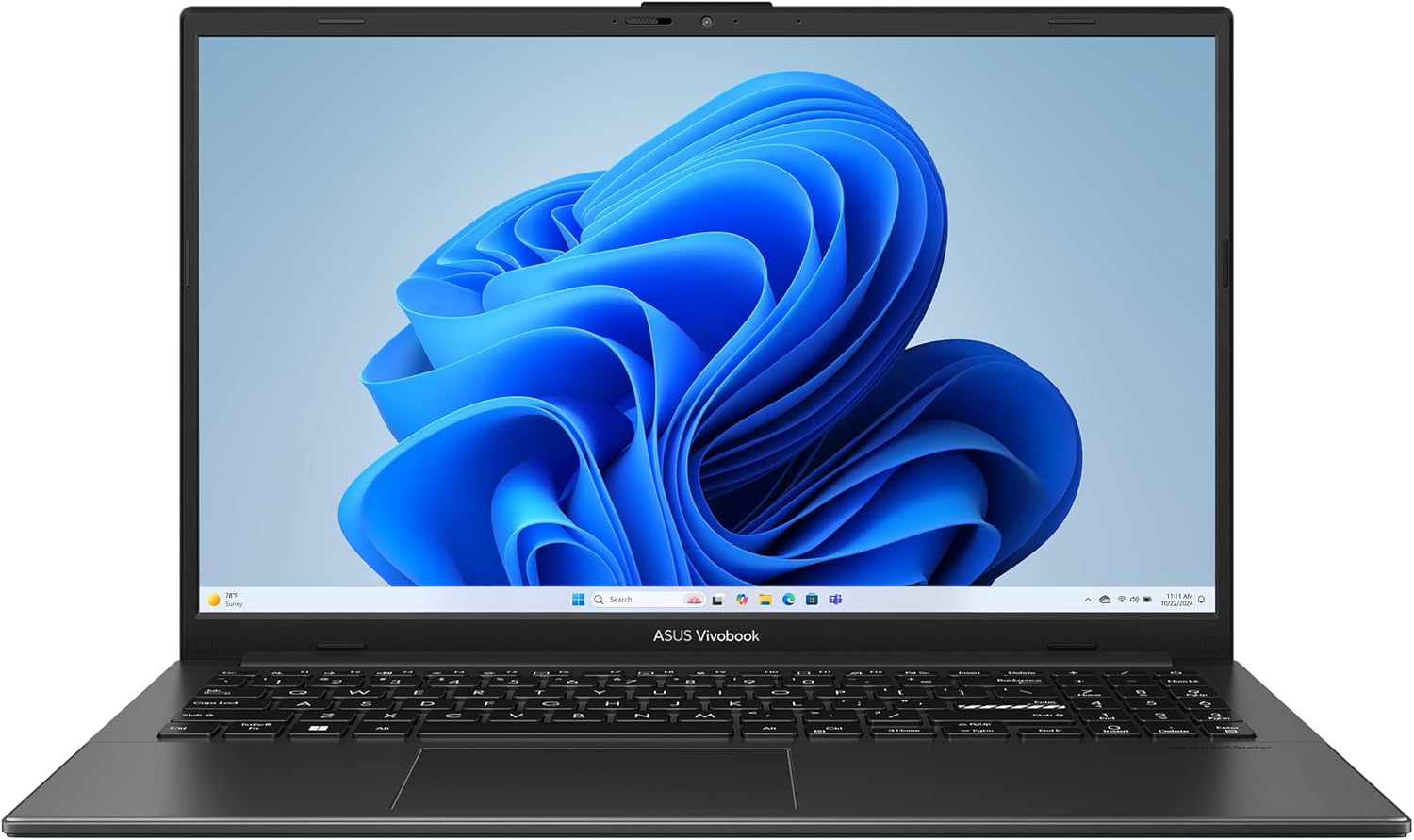
The ASUS Vivobook Go 15.6” FHD Slim Laptop (E1504FA-AB34) is designed to meet the needs of users looking for a practical, lightweight, and modern notebook for everyday computing. Combining an AMD Ryzen 3 7320U processor, 8GB DDR5 memory, a 256GB PCIe SSD, and a 15.6-inch Full HD display, this laptop provides a balanced hardware configuration suitable for common daily tasks.
Whether you’re a student attending online classes, a professional working remotely, or someone who primarily browses the web, streams media, and manages documents, the Vivobook Go series focuses on delivering reliable performance while maintaining portability.
This article explores the laptop’s hardware, design, display, battery, connectivity, and practical use cases to help readers understand what this model offers.
One of the defining characteristics of the ASUS Vivobook Go lineup is portability. The laptop features a slim profile that makes it easy to carry between home, school, work, or travel destinations.
The black finish provides a clean and understated appearance suitable for professional environments, classrooms, and everyday use.
Its lightweight construction allows users to comfortably transport it inside backpacks or laptop bags without adding unnecessary bulk.
The hinge is engineered for daily opening and closing, while the overall chassis emphasizes durability without sacrificing portability.
The Vivobook Go features a 15.6-inch Full HD (1920 × 1080) display, providing significantly more screen clarity than traditional HD laptops.
Benefits of the Full HD resolution include:
The larger screen also makes side-by-side applications more practical compared to smaller notebooks.
Users working with Word documents, presentations, web browsers, or online learning platforms benefit from the additional workspace.
The anti-glare characteristics help reduce reflections under typical indoor lighting conditions, improving viewing comfort during extended sessions.
Powering the system is the AMD Ryzen 3 7320U, an energy-efficient processor designed specifically for lightweight notebooks.
Key processor characteristics include:
The Ryzen 3 7320U handles a wide variety of everyday workloads, including:
Its efficient design helps balance computing performance with longer battery operation.
Graphics processing is handled by integrated AMD Radeon graphics.
Although not intended for demanding 3D rendering or professional gaming, the integrated GPU is capable of supporting everyday visual workloads such as:
Hardware video acceleration also contributes to smoother playback while reducing processor workload.
The system includes 8GB of DDR5 RAM, bringing several improvements over previous memory generations.
Advantages include:
For many users, 8GB provides enough memory for:
Efficient memory management allows the operating system to remain responsive during normal productivity workloads.
Storage is provided by a 256GB Solid State Drive (SSD).
Compared to mechanical hard drives, SSD technology offers major improvements in:
Users can expect noticeably quicker startup times and faster access to frequently used applications.
The storage capacity is suitable for:
Cloud storage services can further expand available storage for larger files.
The laptop ships with Windows 11 Home, Microsoft’s modern desktop operating system.
Windows 11 introduces several productivity improvements including:
The operating system supports a wide ecosystem of applications, making the laptop compatible with educational, business, and personal software.
One notable convenience feature is Fast Charging.
Instead of waiting several hours for the battery to recharge completely, fast charging helps restore usable battery capacity more quickly.
This feature is especially useful for:
Short charging sessions can provide additional usage time when schedules are busy.
Privacy has become increasingly important as video conferencing grows more common.
The ASUS Vivobook Go includes a physical webcam shield.
Unlike software-based camera controls, a physical shutter allows users to cover the webcam when it is not in use.
Benefits include:
This simple feature reflects a growing emphasis on user privacy.
The laptop is built to meet MIL-STD-810H military-grade durability standards, which involve testing under various environmental conditions.
While this does not mean the laptop is indestructible, it demonstrates that the design has undergone durability testing related to factors such as:
For users who frequently carry their laptop between locations, this added durability contributes to long-term confidence.
The full-size keyboard is designed for comfortable everyday typing.
The spacious layout supports:
Well-spaced keys help reduce typing errors while maintaining comfortable travel.
The larger touchpad provides responsive cursor control for navigation without requiring an external mouse.
The ASUS Vivobook Go includes multiple connectivity options for everyday accessories.
Typical ports include:
These connections allow users to connect:
Wireless connectivity supports modern networking and Bluetooth accessories.
The laptop is suitable for everyday entertainment.
Users can enjoy:
Built-in speakers provide convenient everyday audio while Bluetooth support enables wireless headphones and speakers.
The Ryzen 3 7320U processor is designed with energy efficiency in mind.
Combined with SSD storage and DDR5 memory, the overall platform is optimized to reduce unnecessary power consumption during light workloads.
Actual battery life varies depending on:
Light productivity generally places lower demands on battery resources than intensive workloads.
The ASUS Vivobook Go is well suited for numerous daily activities.
Examples include:
These common workloads align well with the laptop’s balanced hardware configuration.
Students can benefit from several aspects of this laptop:
Typical student tasks include:
For families and personal users, the Vivobook Go supports a variety of household computing needs.
Common activities include:
Its straightforward configuration makes it suitable as a shared family computer.
Professionals working remotely often require dependable hardware for communication and productivity.
The Vivobook Go supports:
The webcam shield also provides additional privacy when meetings have ended.
The combination of Ryzen processing, DDR5 memory, SSD storage, and Windows 11 creates a responsive environment for daily productivity.
Users can efficiently manage:
For users with modest computing requirements, this balanced configuration emphasizes practicality over unnecessary complexity.
Windows 11 includes several built-in security technologies designed to help protect user data.
Features include:
Combined with the webcam shield, these features contribute to a safer everyday computing experience.
With 256GB of storage, users can maximize available space by:
These practices help maintain system responsiveness over time.
The ASUS Vivobook Go 15.6-inch model is designed for users whose primary focus is everyday computing rather than specialized high-performance workloads.
It may be appropriate for:
Its combination of portability, efficient hardware, modern connectivity, and practical features makes it adaptable to a wide range of routine computing tasks.
The ASUS Vivobook Go 15.6” FHD Slim Laptop (E1504FA-AB34) brings together a modern collection of features in a slim and portable design. Equipped with an AMD Ryzen 3 7320U quad-core processor, 8GB DDR5 memory, 256GB SSD storage, and a 15.6-inch Full HD display, it is built to handle everyday productivity, online learning, web browsing, and multimedia consumption with efficiency.
Additional features such as Fast Charging, a physical webcam shield, Windows 11 Home, and MIL-STD-810H military-grade durability testing further enhance its practicality for daily use. The responsive SSD, modern memory technology, and balanced hardware platform contribute to a smooth user experience across common tasks.
For individuals seeking a dependable laptop for school, home, or office activities, the ASUS Vivobook Go delivers a thoughtfully designed combination of portability, performance, and convenience while supporting the essential computing needs of today’s users.